How IPSec Tunnel Protocol Works in 2025: Features, Uses, and Setup
Secure transmission of data over any network is essential nowadays due to the increasingly lethal attempts by cybercriminals that could compromise your sensitive information. IPSec Tunnel is one of the finest networking protocols that enables users to send their data through encrypted, authenticated, and enhanced data packets.
If you want to know what the IPSec Tunnel Protocol is and how to set it up on Android and iOS, keep reading this guide.
What is the IPSec Tunnel Protocol?
IPSec Tunnel Mode or Protocol is an attempt to put IPSec on your entire network, allowing original IP packets to be fully encrypted and enclosed in another IP packet. This is the best thing to keep your private data out of prying eyes since the VPN.

Once you’ve set up the IPSec Tunnel Protocol, these are the key features you can avail:
- You can encrypt both the original IP header and the payload.
- Replace the original header with a new IP header for routing.
- Connect two networks securely via site-to-site VPN.
- Protecting all the traffic between two network gateways.
Difference Between IPSec Tunnel and IPSec Transport

Understanding the main difference between IPSec Tunnel Protocol and IPsec Transport mode requires you to understand how they both work exactly.
- IPSec Tunnel Protocol secures the header and the payload packet of your IP address, whereas IPSec Transport encrypts only the payload data.
- The new IP header provided by IPSec Tunneling runs an encryption while you are online, whereas IPSec Transport keeps the original IP header intact.
- IPSec Tunnel is used for VPNs, and IPSec Transport is used for end-to-end communication between two servers or office networks.
- IPSec Tunnel Protocol is set up between gateways, firewalls, routers, and VPN servers. IPSec Transport is only used within networks where data encrypted isn’t required.
- You can secure your entire network with IPSec Tunnel Mode, even on untrusted networks. Tunnel Mode is less private in this way.
How to Set Up IPSec Tunnel Protocol on iOS
You can set up IPSec Tunnel Protocol on iPhone and iPad by following these steps:
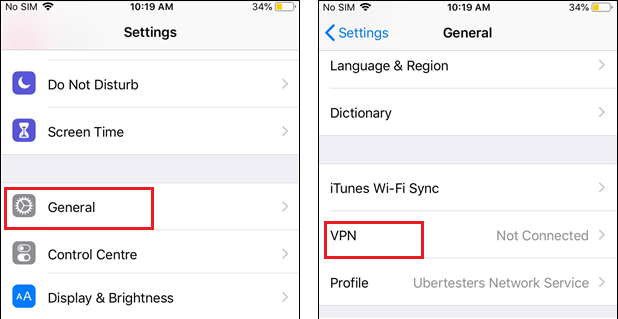
- Go to Settings > General > VPN & Device Management > VPN > Add Configuration.
- Select IPSec in Type.
- You need to enter the Description, Server, Account, and Password provided to you by your VPN provider.
- Set Use Certificate to OFF.
- Leave Group Name as blank.
- For Secret, type 12345678.
- Turn the Proxy OFF.
- Tap Done, your VPN profile will now show under VPN settings.
- Turn on the Status of your VPN connection.
How to Set Up IPSec Tunnel on Android
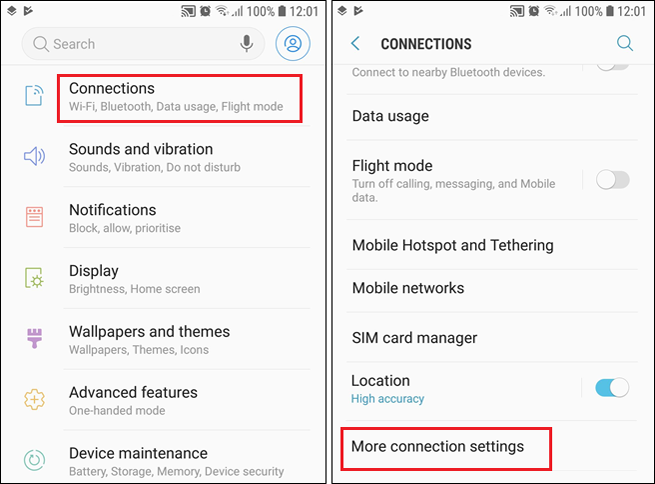
Configuring IPSec Tunnel Mode on your Android device can be done like this:
- Go to Settings > Connections > More Connection Settings.
- Tap on VPN, add a new VPN profile.
- Enter the details mentioned below.
- Save the settings.
- Go to the VPN profile and tap to connect.
Name: Ivacy VPN IPSec
Type: Select IPSec Xauth PSK from the list
Server Address: (Get the server address from the VPN’s official server list)
IPSec Pre-Shared Key: 12345678
Username: (Enter your Ivacy VPN username)
Password: (Enter your Ivacy VPN password)
Best VPN Protocol in 2025
A VPN (Virtual Private Network) allows you to choose from a variety of VPN protocols. Technically, these are the methods for your device to connect to the VPN server. Every protocol is known for its prominent features in terms of encryption, speed, and stability.
Still not sure which VPN protocol you should go for in 2025? Here is a brief description of the best four internet protocols, which might help you choose the best VPN protocol in 2025 for better speed and overall security.
- Open VPN is a highly secure and stable VPN protocol that works with a number of devices. It’s a hassle-free attempt to avail better connectivity and online privacy.
- WireGuard protocol is a modern and lightweight protocol that is great for mobile use and offers better battery life.
- IPSec provides stronger encryption than the other two, which means better privacy. Called the best alternative to OpenVPN and WireGuard, IPSec is found in built-in VPN settings in Android and iOS devices.
- IKEv2 protocol works best for users who mainly rely on mobile networks, and this makes it ideal for smartphones and tablets. IKEv2 is capable of reconnecting whenever your connection drops.
What are the Benefits of IPSec VPN?

To keep your online connection secure at all times, IPSec is used by the majority of VPN users who want to prevent trackers and other forms of cyberattacks from reaching them and disrupting their privacy. What makes the IPSec VPN protocol a reliable choice is that it’s built for a number of operating systems, such as Windows, Android, iOS, and macOS.
Other key features of IPSec VPN are as follows:
- Limits replay attacks remarkably, IPSec VPN assigns a different sequencing number to each IP packet. Therefore, when two packets have the same number, it is considered a replay and is dropped.
- With data origin authentication, the IPSec VPN protocol verifies who has sent the data through the Hash Message Authentication Code (HMAC), or if it has been altered during transmission by verifying the packets.
- IPSec Tunnel allows you to have a unique set of encryption keys, which makes it impossible to steal.
- The protocol works automatically with your devices and apps without needing any changes.
- IPSec VPN Protocol changes your encryption keys on a regular basis to strengthen your connection privacy.
- Before sending any data, IPSec VPN encrypts it so that only the receiver can read it.
Conclusion
If you are aware of the seven pillars of data protection, you must know IPSec Tunnel Protocol guards every single one of them with its advanced encryption technique that works both on the IP header and payload. There is so much you can do with the IPSec VPN protocol when it comes to keeping your connection private and secure; you can prevent replay attacks. can verify the authenticity of any data, and regularly updating the encryption keys gives you leverage over cybercriminals’ plans.
Whether you are on Android or iOS, IPSec is built into those operating systems and is still a top choice for beginners and advanced users looking to enhance their VPN connection in 2025.

Frequently Asked Questions
How to use IPSec VPN?
You can use IPSec VPN on Android and Windows devices that are generally used alongside L2TP and IKEv2 protocols. On iOS, IPSec is configured alone without any other protocols.
Is the IPSec tunnel TCP or UDP?
IPSec Tunnel Protocol utilizes UDP as it allows the IPSec packets to pass through the firewalls.
What ports are used by IPSec?
You can find IPSec ports open in the firewall, but if that’s not the case, you can do it by opening UDP port 500.