VPN for Briar – Protect Your Identity and Metadata

Many private messengers don’t live up to their claims, as they share substantial amounts of users’ metadata and impose censorship in different parts of the world. Privacy enthusiasts from all around the world are choosing Briar over traditional messengers like WhatsApp, Signal, or Telegram because they can have a firm grasp on their security levels.
Also, because Briar’s offline messaging that syncs directly via Bluetooth, Wi-Fi, or USB drive without an internet connection. Adding a VPN to this perfect setup may raise a few questions, like how you can use a VPN with Briar Messenger? Is it doable? Wouldn’t there be any glitches?
This guide provides the technical understanding of Briar, how it works, and why pairing it with a VPN can help you improve privacy and security further.
Understanding How Briar Works
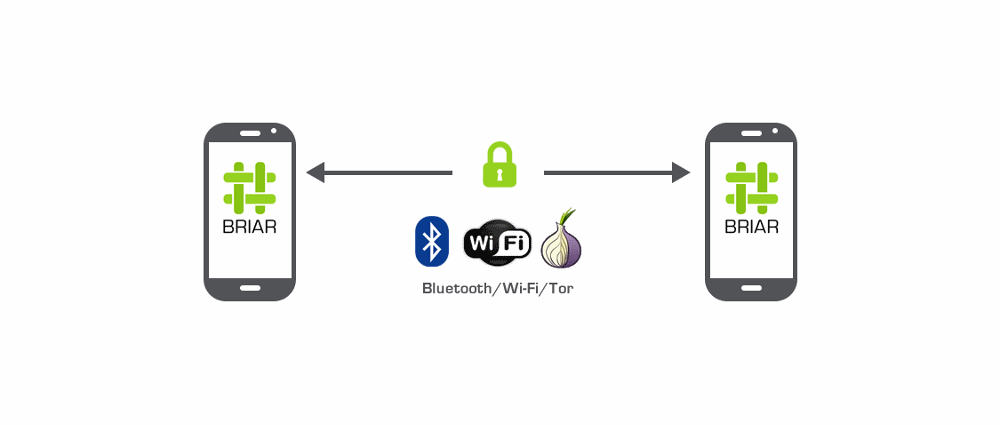
Briar connects users to the outside world in two different ways:
Offline Transport: Works when there is no internet connection. Briar syncs messages via Bluetooth or Wi-Fi to nearby devices without needing the internet.
Tor Transport: While using the Briar online version connected to the internet, it routes every message through the Tor network, which is used by millions to evade surveillance and censorship.
You can say Briar does not rely on standard cellular or Wi-Fi data to send your traffic. It has a built-in Tor daemon to encrypt users’ data and send it to multiple relays before it reaches you.
Question! Can You Use a VPN with Briar?
Yes, you can use a VPN with Briar by circumventing its default “Tor-only” restrictions. This Tor network’s overriding feature helps many users to access Briar in regions like China, where it’s completely blocked. A VPN serves as a transport proxy in this matter, hiding Tor traffic from the ISP and routing it to its own VPN tunnel.
Here is how the Briar traffic flows without a VPN
Device > ISP > Tor Network > Receipient
This will notify your ISP about your Tor-related traffic, connection timing, and all of which can be subjected to throttling.
But with a VPN
Your device > VPN Server > Tor Network > Recipient
The best part here is that your ISP can only see encrypted VPN traffic while your actual IP address stays hidden.
How to Use a VPN for Briar
Follow these steps to get started with a VPN for Briar:
- Find a reputable VPN with a kill switch and split tunneling features.
- Download and install the VPN app on your device.
- Configure Split Tunneling by routing general traffic, including Briar, through VPN.
- Connect to the VPN server of your choice.
- Open Briar and check Tor status.
- Test offline mode.
- Open the Briar mailbox for uninterrupted message delivery, run Briar on a dedicated online device connected to a VPN.

Why Should You Use a VPN for Briar?
In certain conditions, using a VPN for Briar is recommended, which involves:
- When you are in a region that does not allow Tor network delivery, a VPN helps in bypassing the blocking. This especially happens after Tor bridges and plugabble transports are failed.
- Using a VPN to hide your Tor-related traffic from your ISP is another situation that demands a VPN. Doing this will allow you to mask your connection to the public Tor relay, which your ISP can see.
- While using Briar on public Wi-Fi networks, a VPN is considered helpful as it adds an extra layer of security to your communication pathway. This works best against cybercriminals and malicious actors who are around at every coffee shop, hotel, or airport.
Tips Before Using a VPN with Briar
If you have found the right VPN for Briar, you must remember these tips to start correctly:
- Use Always-On VPN to ensure every connection runs with a VPN, and if not, it will get blocked. The feature is essential to prevent accidental leaks of IP addresses or sensitive data.
- Make sure the split tunneling feature is configured to route all apps, including Briar, through the VPN server.
- Update to the latest version of Briar, as it will include the updated Tor bridges that work well to provide security even without a VPN.
Who Can Use a VPN for Briar?
A VPN for Briar is not just for everyday privacy, but it’s widely used by activists or journalists to hide their Tor usage from ISPs.
Individuals who travel frequently use VPN to secure their Briar communication on public Wi-Fi, so they won’t be targeted by man-in-the-middle attacks or anything.
Conclusion
Briar works best defeating regional limitations, and its offline communication is impeccable. All a VPN does is improve privacy posture by hiding its Tor usage, particularly ideal for strengthening the security in threatening environments.
Whether you are a journalist, activist, or privacy advocate, using Briar without a VPN is alright. But if you are facing hurdles that block Tor, using a VPN can route your traffic to a trusted network with a no-logs policy. Only a few VPNs are up to this, and those are not the free ones!