How to Setup VPN for Work From Home [2025 Guide]

After 2019’s Coronavirus pandemic, the trend of “work from home” has risen substantially, so that it’s now a permanent way for millions of people to do their jobs. Undoubtedly, WFH is flexible and offers alot of comfort, like you don’t have to mingle with everyone at the workplace, no long commutes, and you can wear whatever you want. However, there are a few drawbacks to remote working when it comes to your cybersecurity.
According to the recent survey, remote work is more dangerous than working from an office. So naturally, letting your cybersecurity guards down is a big mistake one can commit. This is why making use of VPNs in 2025 is a prominent gesture to prevent the malicious attacks intended to breach your privacy and sensitive data.
![How to Setup VPN for Work From Home [2025 Guide]](https://aemagazine.pk/posts/think_it_work_from_home_wfh_challenges_and_opportunities.png)
Why is it important to use a VPN for remote work?
A VPN allows remote workers to utilize the company’s resources without being connected to the server. It encrypts your internet traffic, lets you access the private data over a private connection, and you can do this from anywhere.

Public computers and Wi-Fi networks pose a significant threat to your device and data, making it unsafe to perform office work or use banking apps on these networks. The uses of a VPN (Virtual Private Network) in such conditions are:
- Date encryption is a technique employed by modern VPN software to hide your online activity from hackers. The best VPNs for remote workers in 2025 have a 256-bit encryption feature that encodes your internet traffic throughout.
- You can simply hide your location by masking your IP address, making it difficult for trackers to target you with ads.
- You can log in to your company’s cloud server without posing a threat to their server.
- If you are travelling, a VPN can help you bypass geo-restrictions. This way, you can work with all the geo-restricted sources and websites without facing regional limitation errors.
Setting Up a VPN at Home in 2025
A VPN software is easy to acquire and use; all you have to do is find one that can offer the following features:
- Multiple servers from different locations
- Multiple device support
- Internet-Kill Switch
- No-logs policy
- AES-256 encryption
- Available for multiple OS
Once you have subscribed to the VPN service, it’s time to install the VPN software on your device. Now, every device has a separate way of installing a VPN. If you are using a Windows or macOS device, simply download the installer from the browser on their official website. For smartphone users, you can simply find it on the Google Play Store and the Apple App Store.
After installing the VPN on your device, it’s time to work the magic! Launch the VPN and go to their server list; you may find a list of servers based on regions. Pick your own country if you are doing this for remote working, and hit the “Connect” button. Once connected, you can avail all the regional-specific services without a glitch.
Afterwards, test your connection to ensure your IP address and DNS requests are hidden; you can either use whatismyip.com or dnsleaktest.com

Advanced Security Strategies for Remote Workers in 2025

As VPN provides security to remote workers to a marked extent, but it can’t help if you have left the basic loopholes open. Follow these tips to ensure a completely secure network to work from home.
- Keep your mobile device and laptop locked while not in use. Use strong passwords and use a fingerprint lock if available.
- Keep your device’s software up to date to fix the recurring bugs.
- Multiple-factor authentication can be used on email, cloud servers, and even company portals to protect you from unauthorized access. It’s one step ahead of passwords.
- Encrypt the entire disk via the built-in tools you can find on both Windows (BitLocker) and macOS (FileVault).
- Do not connect to public Wi-Fi without antivirus and VPN software running in the background.
How to Set Up Remote Access VPN
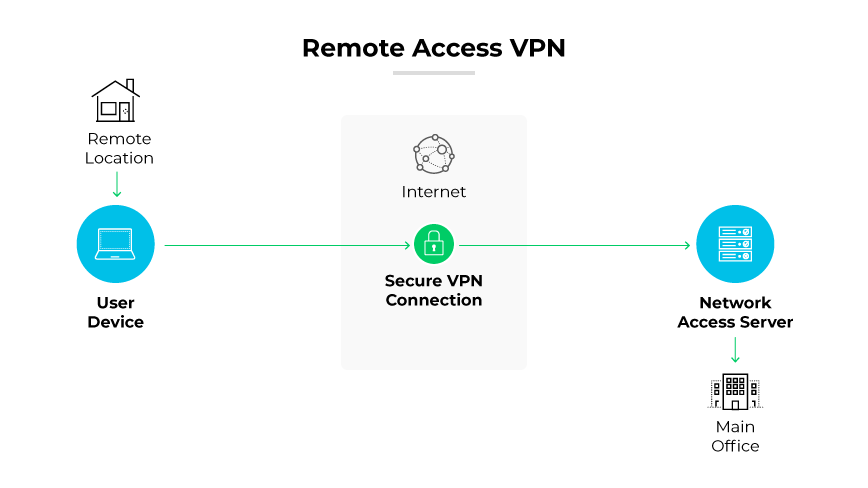
Remote access VPNs provide a centralized VPN management system that provides features like dedicated IPs and Split Tunneling for better performance and remarkable cybersecurity. A remote access VPN simply establishes a secure connection by hiding all the traffic from your device to your company’s network.
Setting up a remote access VPN is very easy. Just subscribe to the VPN, go to their admin dashboard, where you can add team members and modify their access settings, and connect to your preferred server.
Future of Remote Work in 2025
A report from Gallup in 2025 found that 58% of professionals are working remotely part-time. The flexible hours, easy remote work policies, and attractive salaries make it continue to rise. But on the other hand, it has also given birth to a few problems, like remote work scams and cyberattacks on the company’s server, for which a change in habits is required.
Using a VPN for remote work is just a starting point to stay clear of cyberattacks, which are frequently evolving as we speak.
Conclusion
Working from home is definitely a blessing, and there is nothing comfy than sipping a cup of coffee and doing work at your own pace. Because of the cybersecurity risks, remote working is now considered a hazard to our privacy, which is absolutely not the case!
Setting up a VPN for work from home is one of the effective methods to ensure safe remote connectivity and keep the most common cyberattacks in 2025 out of sight, such as phishing attacks, data breaches, IP leaks, and infiltration of the company’s private data.


