How to Prevent Laptop Camera from Being Hacked

Whether you are in the office at a meeting, doing remote work, or catching up with family from far away, our laptop camera is prone to cyberattacks. Camfecting allows hackers or cybercriminals to spy on you through your device camera without you knowing it. If you want to learn how to prevent your laptop camera from being hacked and stay safe online, this guide will provide you with the 10 best ways.

How Would I Know If My Laptop Camera is Hacked?
There will be signs that might indicate your laptop camera has been hacked, these are:
- Your laptop camera light will turn on without a command
- Unusual pop-ups
- Active background processes
- Slow performance
- Changes in webcam settings
- Battery drains
- Unusual network activity
If you experience any of these signs, it’s better to run a diagnostic test or a malware scan to help you find the suspicious applications.
How Do Hackers Access Your Laptop Camera
To apply proficient webcam security, it is crucial to understand what methods hackers use to access or hack your laptop camera:
Remote Access Trojans (RATs)
RATs are the first attempt by many hackers where they send you emails, links, and software downloads that contain the malware. Upon unleashing, it gives hackers full control over your device.
Phishing Attacks
Sometimes hackers pretend to be someone you know or tell you they are from a legitimate source, and trick you into clicking on malware-containing links. Do not fall for these phishing attacks as the best way to avoid is to identify it first.
Outdated Operating System
If your system is not updated, it will have loopholes for hackers to infiltrate. This is why regularly updating your operating system is deemed necessary.
Hacks via Web Browsers
Hackers can exploit permissions on web browsers so they can gain access to your laptop camera. It’s better to revoke the permissions after you’ve worked with a certain website.
10 Ways to Prevent Your Laptop Camera from Being Hacked
To improve webcam security and to avoid camfecting in 2025, these are the best solutions you could try:
1. Covering Webcam Physically

One of the best ways to cover your laptop camera’s lens is with a cover. This could be anything, such as a tape or a paper slide, which can block the camera lens while not in use.
It’s simple, doesn’t require anything expensive, and is quite effective against infecting.
2. Disable Laptop Camera in Device Manager
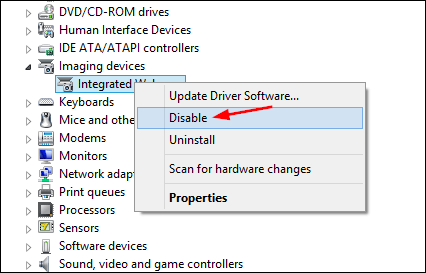
In Windows, you can do this by following these steps:
- Right-click on the Start Menu.
- Select Device Manager.
- Expand the Imaging devices tab.
- Right-click on the webcam icon and choose Disable device.
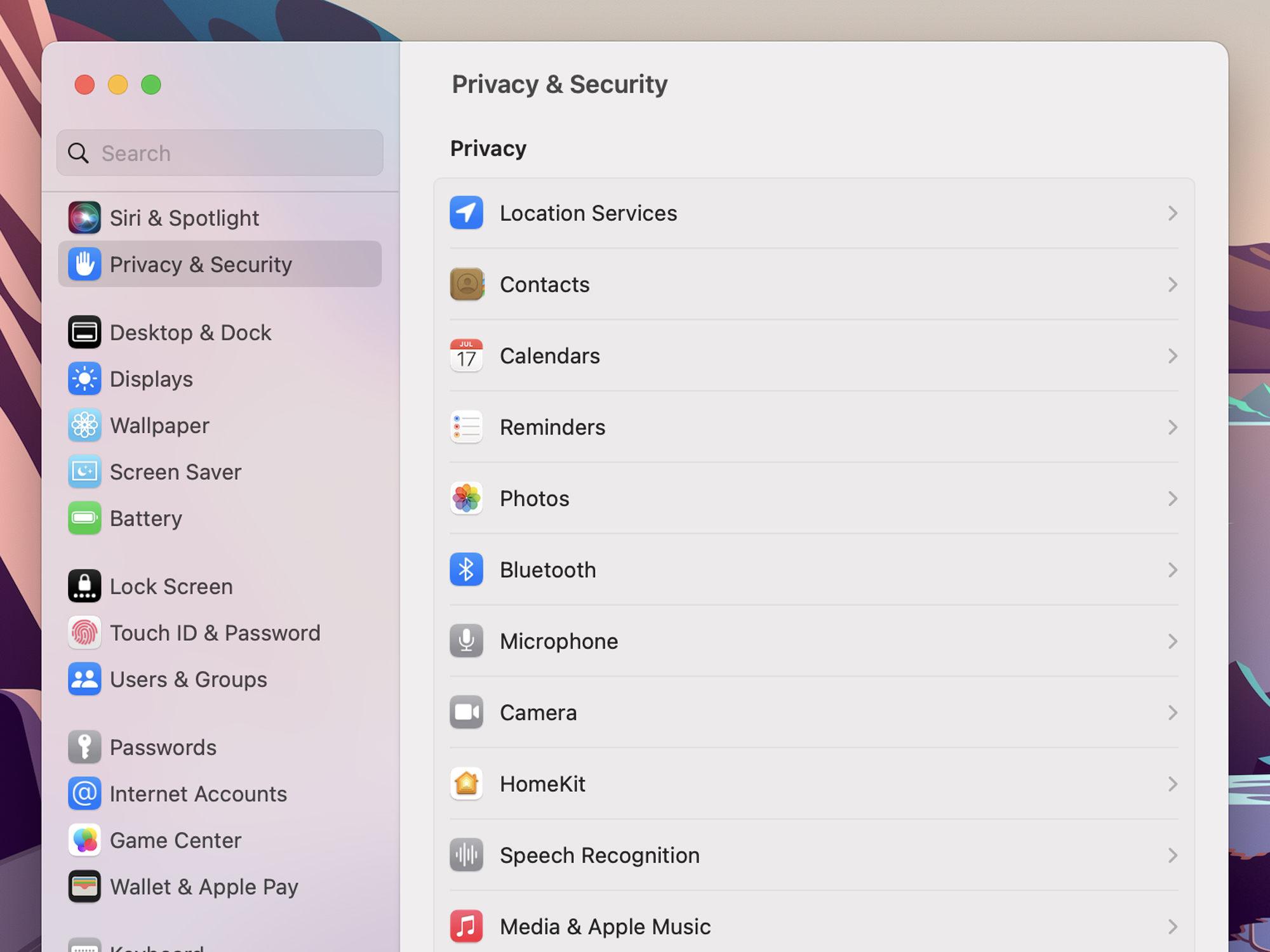
3. App Permission (Windows and macOS)
Checking app permissions will allow you to permit only limited requests to access your laptop camera. You can also restrict all permissions if you want.
- On Windows, you can go to Settings > Privacy > Camera, and disable access for the apps that you don’t need.
- On macOS, System Settings > Privacy & Security > Camera, uncheck the apps to restrict camera access.
4. Regular OS Update
If your operating system is not updated on a regular basis, it will leave you vulnerable to cyberattacks, including your laptop camera being hacked. Installing the latest software will equip your system with advanced features for webcam security.
5. Use Antivirus and Anti-Malware Software
There are tons of antivirus and antimalware software that work to prevent your webcam from being hacked by detecting RATs (Remote Access Trojans). Regular scans with these tools will also enable real-time protection.

6. Secure Web Browsers
Using secure web browsers is recommended by many privacy and security experts to help you protect yourself from tracking, microphone, and camera access. Some of the best names in this category are Tor and Brave.

7. Do Not Click on Unsolicited Links
Phishing attacks do come as friendly, and they will strike you as someone trustworthy who they aren’t! Since they do pretend to be someone else, but you can identify them from their suspicious links and the sender’s nature, which seems a bit odd. What’s more, suspicious file extensions will be found with their attachments i.e .bat, .exe, .scr.
8. Securing Your Wi-Fi Network
If your internet connection is not secure, nothing is! By not having a secure wi-fi connection, you will be inviting a plethora of privacy breaches, and someone might also gain access to your laptop camera. Here are the tips to strengthen your Wi-Fi network against being hacked.
- Change the default router’s credentials
- Update your router firmware regularly
- Use WPA3 and WPA2 encryption
- Hide your network name (SSID)
9. Scan for Remote Access Software
It is better to monitor the unwanted remote access programs like AnyDesk, Chrome Remote Desktop, and TeamViewer, which allow full remote access. If you don’t identify a program running on the background, it’s recommended to uninstall it immediately.
10. Use a VPN
One of the perks of using a VPN is that your entire network becomes safe and secure via an encryption technique. This will hide your internet traffic, including your IP address, which makes it impossible for your laptop camera to be hacked!
Cybercriminals spy on you through the internet, and once your connection is secure, your privacy is hard to breach. Best VPNs to avoid being affected, such as Ivacy VPN, offer wholesome protection against a wide range of cyber threats. 256-bit encryption, multiple protected VPN servers, a no-log policy, and the ability to be anonymous online can help you enjoy the internet without being traced and attacked.

Does VPN help with Getting Hacked?
How do you get hacked? You just provide hackers with unauthorized access to your device, which they use for multiple malicious purposes. But if you have got your IP address covered, it becomes extremely difficult for them to gain access or launch any type of attacks on your device.
Conclusion – Use Your Laptop Camera Safely!
Your laptop camera is a potential spyglass that can reveal a lot of sensitive information. Nobody wants to be watched, and the good news is that now you can prevent your laptop camera from being hacked. With a combination of our 10 best ways and tips, you can achieve remarkable cybersecurity that will keep you and your personal information safe!
The idea of being cautious works in this; you can start this by adapting some useful tools like antivirus, antimalware, and VPN software to keep you one step ahead of cybercriminals.
Frequently Asked Questions
Can hackers access a laptop camera?
Yes, hackers can access a laptop camera remotely, and they can also bypass the LED indicator.
Why cover a laptop camera?
It’s a good idea to cover your laptop camera while it’s not in use, even if your camera is being hacked; covering it may resolve the majority of the issue.
How realistic is someone accessing your webcam through malware?
If your webcam is connected to the internet, it can be hacked. It also depends on the intention and expertise of the hacker to hack your laptop camera through malware.