How to Delete Your Facebook and Restore Your Privacy
Facebook data breaches are increasing day by day. Even in 2025, Jeremiah Fowler, a renowned cybersecurity researcher, revealed a database which has over 184 million credentials leaked across Facebook and Google. There was other information found in that database that involved usernames and passwords for banking accounts, government portals, and health platforms. Moreover, a recent report on data breaches revealed that about 16 billion passwords were breached across Facebook, Instagram, Google, and Apple.

Many of us would already want to delete our Facebook account so we can restore our privacy, but in order to do that, we have to find out how it’s done, considering there have been changes in Facebook account settings.
Why Do People Delete Their Facebook
In 2025, Facebook is still an extremely popular social media platform with 3 billion users worldwide. Having said that, Facebook is losing its popularity because of its attempts to violate privacy. But if you think this is all, you need to hear other reasons why you should delete Facebook.
- Facebook performs data harvesting, which is a technique to collect a massive amount of data from billions of users. This goes by tracking your online activity, location, messages, and browsing history, which is something third-party companies are interested in.
- After data harvesting, Facebook utilizes your data for targeted advertisement, a prominent chapter in surveillance capitalism that gets you similar ads based on your interests.
- One of the important reasons to delete your Facebook is to get your mental health in check since social media platforms are known to cause anxiety, depression, addiction, and an effect on self-esteem.
Difference Between Facebook Account Deletion and Deactivation
When you deactivate your Facebook account, you are disabling it temporarily. You can still use Messenger and recover your account without losing the data permanently.
Whereas, Facebook account deletion will permanently delete your account and all of the information saved. You will not be able to use the Messenger app anymore.
Smartly conceived, around 90% of users who deactivate their Facebook account tend to come back within a few days or weeks. So let’s cut to the chase and find out how to permanently delete a Facebook account straight away!
How to Delete Facebook Account in 2025
To claim your privacy and delete your Facebook account on Desktop, follow these steps:
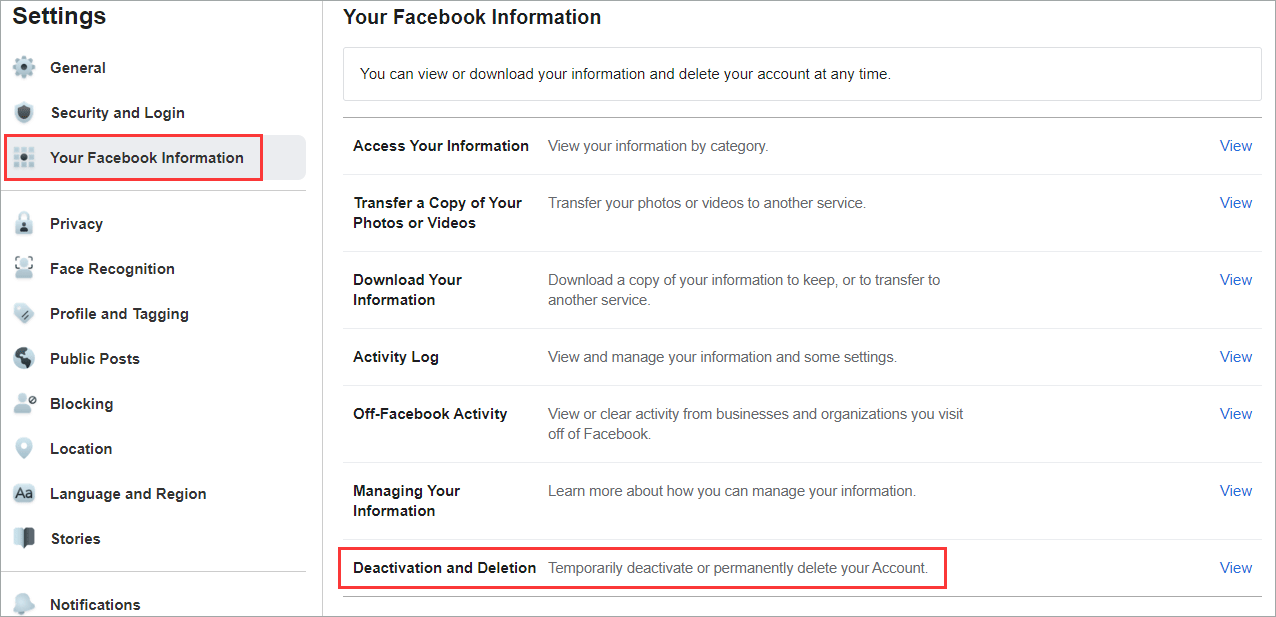
- Open Facebook on a browser and sign in.
- Go to Settings & Privacy > Settings > choose Your Information from the left column.
- Click on Deactivation and Deletion.
- Select ‘Delete Account’ and Continue with your password.
Here’s how you can delete Facebook from your mobile:

- Launch the Facebook App on your Android or iOS phone.
- Navigate Menu > Settings & Privacy > Settings > Accounts Center > Personal Details.
- Select Account Ownership and Control > Deactivation or Deletion.
- Choose Delete Account and confirm with your password.
What Happens After You Delete Your Facebook

Facebook gives you 30 30-day time period before approving the deletion request, which might be a trick to get you back. But if you choose to keep quiet and get the deletion request approved, here is what’s going to happen:
Everything in your Facebook account will be permanently removed, including your profile picture, photos, videos, and posts. You can also say goodbye to Facebook Messenger, but again, it takes around 90 days for Facebook to delete your account permanently from their server.
Time to Restore Your Privacy
Deleting Facebook is just a small thing in the grand scheme of the internet, where billions of data files are shared every day. You need to adopt some measures through which you can fully restore your privacy in today’s digitally wild world.
Use Privacy Browsers
There are a number of browsers that prevent tracking and targeted advertisement; you just need to pick the right one. Some of the top-ranked options re Brave, DuckDuckGo, and Tor Browser.
Use a VPN for Privacy
A VPN (Virtual Private Network) is a useful tool for 2025 cybersecurity. The sole purpose of a VPN is to hide your IP address, but there are other things a modern VPN could do, like encrypting your internet traffic so it will be protected from trackers and malicious spyware. Ivacy VPN, under a very feasible budget, provides the features that will keep you hidden and protected in the online world.
Use Best Alternatives
Try to give a chance to the best alternatives to Facebook in 2025. You may like Telegram, Discord, Reddit, Diaspora, Vero, and Minds. This will allow you to avoid the only threat you are worried about: not using Facebook.
Use Alternate Messaging Apps
Traditional messaging apps are a part of Meta and Google that will collect your data whether you like it or not. Switching to the secure alternatives will help you encrypt your messages with strong privacy features. Some of the best names are Signal, Threema, and Telegram in this section.
What’s more? You can also remove the Facebook app from your device, and maybe apps related to it like Messenger and Instagram. It’s also encouraged to maintain digital hygiene by minimizing app permissions and clearing cookies and browser history regularly. For added security, using password managers like 1Password can help prevent attempts to breach your data, as seen in the 2025 breach of 186 Facebook accounts.
Conclusion
Unless you are running a business on Facebook and have been hit by cybercriminals on the platform, deleting Facebook is your first step to restoring your privacy. With your data being stolen and used by giant companies, their practices also go against the most common laws of cybersecurity.
While Facebook and other social media websites are good, exercising care goes a long way. The solution lies in thoroughly getting rid of Facebook. If not, then keeping your data private is one step towards safeguarding your privacy. But even if that’s too much due to our over-reliance on social networking sites, employing a decent VPN such as Ivacy will help you secure your online activities, unlike any other.

Frequently Asked Questions
How do I reset my privacy on Facebook?
You can run a privacy check-up on Facebook by going to Menu > Settings & Privacy > Privacy Checkup on your mobile.
How do I edit my privacy on Facebook all at once?
You can limit who can see your post by going to Settings & Privacy section > Settings. Go down to Audience and visibility and click on Posts.
How do I fully erase a Facebook account?
To fully erase a Facebook account, you have to delete it permanently. This will also erase all the data linked to the Facebook account.