How to Delete Spotify Account [2025 Guide]

- What to Consider Before Spotify Account Delete
- Cancel Spotify Premium Without Deleting Your Account
- Steps to Delete Spotify Account (On Desktop)
- How to Delete a Spotify Account on Android and iOS
- How to Recover a Deleted Spotify Account?
- Best Alternatives to Spotify in 2025
- How to Listen to Geo-Restricted Songs on Spotify?
- Conclusion
- Frequently Asked Questions
The way we listen to music has changed over the last couple of years. Music applications like Spotify and YouTube Music are the prime choices, consisting of millions of songs, playlists, and podcasts. While canceling Spotify’s subscription is an option, some users may want to permanently delete their Spotify account. This could be due to a lot of reasons, but whatever the reason is in your case, we suggest following the exact method to reduce your digital footprint.
Let us explain how you can cancel Spotify Premium and then delete the account. But before, there are a few things to be taken into consideration.
What to Consider Before Spotify Account Delete
If you are considering moving directly to delete your Spotify account, there will be multiple implications, and it would be unfavorable to you.
- Every song that you have liked, saved, or added to your music library or playlist will be gone.
- Premium users will lose their access to Spotify Premium after account deletion.
- Spotify username is a unique name assigned to you, and this would also be erased if you delete your Spotify account.
- Spotify offers a 7-day grace period during which you can recover your account. After this, there won’t be any recovery, which means all your content will not be available to you anymore.
Cancel Spotify Premium Without Deleting Your Account
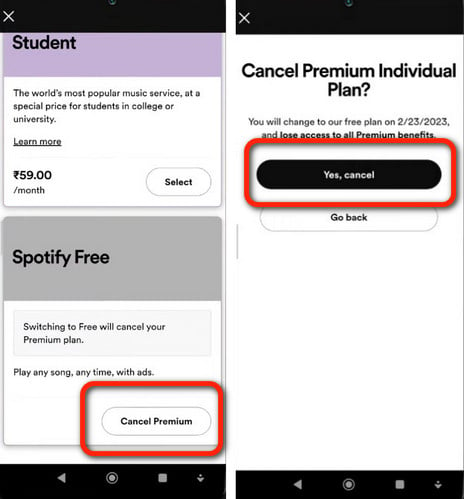
If you want to use Spotify for free, there is a way to cancel the premium subscription without deleting your account. Here’s what you need to do:
- Open the browser and go to the Spotify Account page.
- Navigate Your Plan > Change Plan.
- Select Free Plan located at the bottom.
- Click on “Cancel Premium.”
You will not be losing any of your saved tracks and playlists, but only moving to the free version.
Steps to Delete Spotify Account (On Desktop)
- Go to Spotify’s Account page and sign in with your username and password.
- Go to Account > Close Account.
- Spotify will ask again whether you want to cancel the premium subscription or close your account. Select Close Account.

- As a verification, you need to insert your credentials again.
- Spotify prompt will appear notifying you about the repercussions of closing the account. Click on Continue.

- An email will be sent to your ID. Confirm the account deletion by clicking on the link provided.

This will not immediately close your account, but will schedule it for permanent deletion.
How to Delete a Spotify Account on Android and iOS
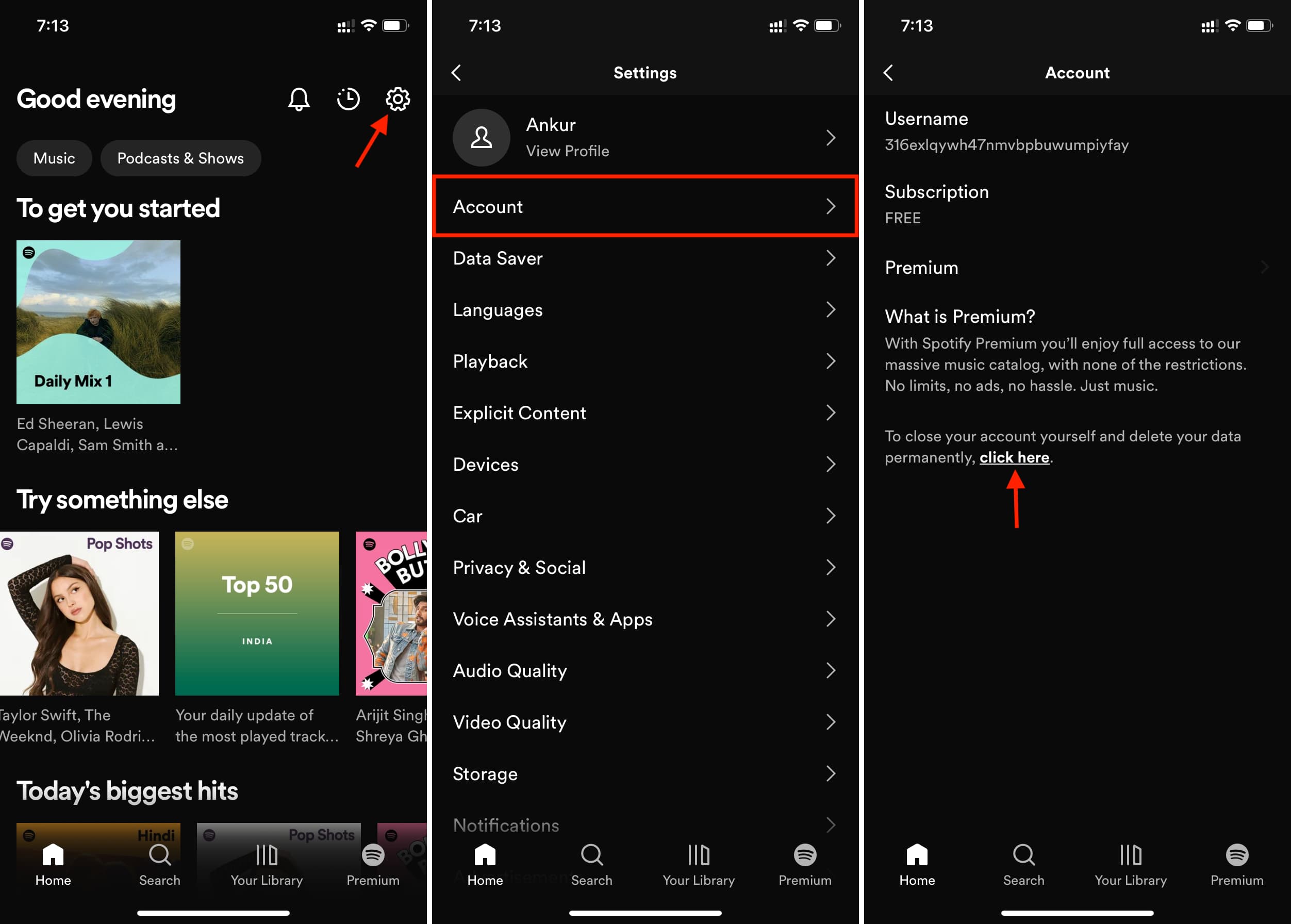
You cannot delete a Spotify account on the Android or iOS app; instead, you need to use the internet browser for this:
- Go to the Spotify support page on your mobile device via browser.
- Log in with your credentials.
- Go to Account > Close Account.
- Confirm after reading the prompt.
- Go to your Email and follow the deletion link.
How to Recover a Deleted Spotify Account?
You may also find people saying, “I accidentally deleted my account, please help!!!” and there is actually a solution to this. Spotify grants its users a grace period of 7 days during which they can recover a deleted account. The recovery link is found in the account deletion email that is only active for 7 days, after which your account will be deleted permanently.
Best Alternatives to Spotify in 2025
If you have deleted your Spotify account because you grew tired of the layout and interface, here are some alternatives to consider in 2025:
Tidal
YouTube Music
Probably the most well-known name so far, YouTube Music is from Google, which means it has music, videos, and also content uploaded on the official YouTube page. With smart recommendations and customized playlists, YouTube Music offers a lot more features on a premium subscription.
Apple Music
Apple Music is a subscription-based music streaming service that is home to around 100 million songs and creative playlists like Spotify. If you are an Apple user, you may find this deeply integrated with Siri.
Amazon Music
To all Alexa fans, Amazon Music combines Music Unlimited and Prime Music, which works like magic with Alexa devices. Its monthly subscription costs $10.99 per month.
How to Listen to Geo-Restricted Songs on Spotify?
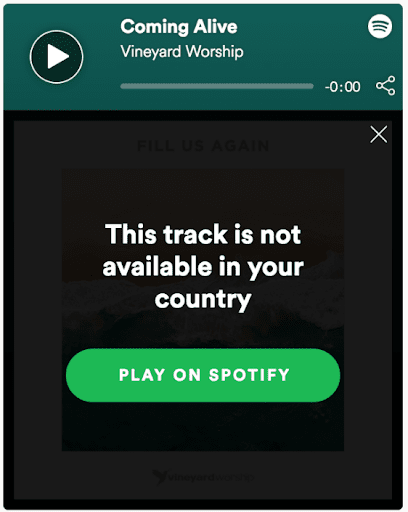
Spotify imposes regional restrictions on some content, and one wouldn’t imagine this considering the application is available worldwide. To access the geo-restricted music list on Spotify, a VPN is used to bypass regional limitations. You need a top-tier VPN for that, and the steps mentioned below will guide you to it:
- Search and find the song you are looking for on Spotify and then close the app.
- Subscribe to the best VPN for streaming, like Ivacy VPN.
- Download and install the Ivacy VPN on your device.
- Follow the on-screen prompts to complete your installation.
- Choose a location where your chosen song is available.
- Now, tap on the Connect icon and launch your Spotify app.
- Head to Liked songs on your Spotify account and enjoy free music whenever you want!
Conclusion
Deleting your Spotify account is a foolish choice to be honest, since it costs you years of saved musical data, including songs, playlists, and even followers. Deleting the account permanently is a hassle-free process that requires no expertise. However, cancelling Spotify Premium is something most people would do instead of deleting it. But again, everybody needs a change of habit from time to time.
Frequently Asked Questions
Why are people getting rid of Spotify?
In 2025, Spotify users grew tired of the platform due to its promotion of AI-generated music, pay-for-play policies for every song, and the military investments made by its CEO.
How to Delete a Spotify Account without a Phone Number?
You don’t need a phone number to delete a Spotify account, you just need an email address that you used to register at first place.
In which countries is Spotify currently banned?
You can’t use Spotify in China, Russia, and Iran since it’s currently banned in those places. If you don’t have a VPN, you cannot access your favorite playlist and liked music.