What Is SOCKS5 Proxy and How Does It Work?
Data protection and privacy have always been the most integral aspects for online users, with thousands of privacy tools like VPNs and proxies used to hide your IP address and give your internet traffic a whole new protected route for transferring.
In this blog, we’ll discuss SOCKS5 Proxy, a type of internet protocol renowned for its ability to manage mixed traffic, enhance speed, and ensure durability. Knowing how SOCKS5 works will also enable you to pick the right privacy protocol in 2025.
What is a SOCKS5 Proxy?
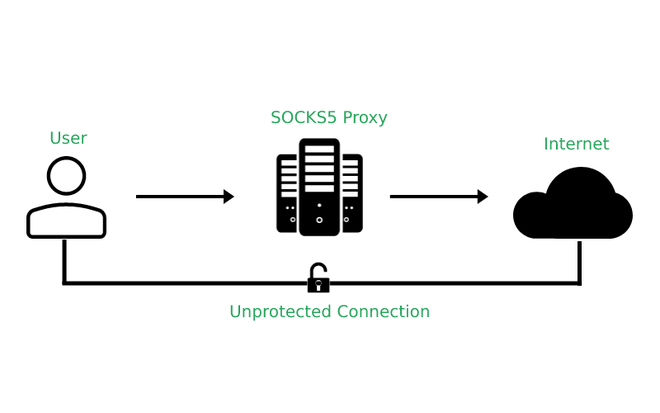
In the domain of internet protocols, SOCKS5 proxy is the one that provides a secure tunnel for your online traffic. When you search for any query on the internet, it will first be sent to the proxy server that masks your IP address. SOCKS5 is the latest version of SOCKS proxy, which renders compatibility with a diverse range of online traffic, as well as featuring password authentication.
This is not like HTTP proxies that mainly deal with web traffic; SOCKS5 can handle FTP, SMTP, and P2P traffic. Making it the best proxy format for users.
How Does SOCKS5 Work?
The developer of SOCKS5 calls it a middleman between your device and the internet. This is how it works:
Connection Initiation > Traffic Redirection > Hiding IP Address > Data Return.
How to Set Up SOCKS5 Proxy on Windows
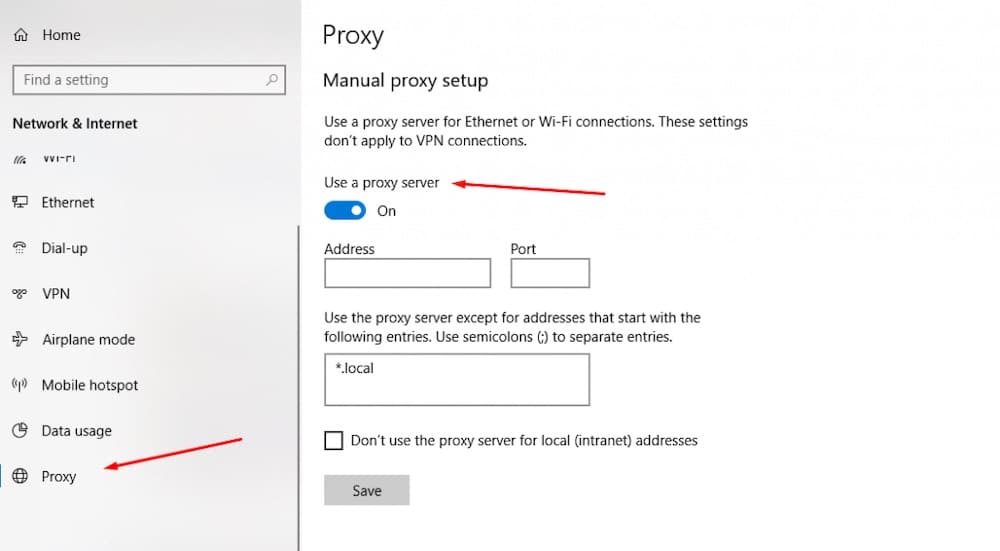
Setting up a SOCKS5 proxy protocol on a Windows PC is a straightforward process that involves the following steps.
- Open Settings > click Network & Internet > select Proxy.
- Under Manual proxy setup, click on Set Up.
- Enable the Use a proxy server option.
- Enter SOCKS5 proxy server information.
- Click Save.
How to Set Up SOCKS5 Proxy on Mac
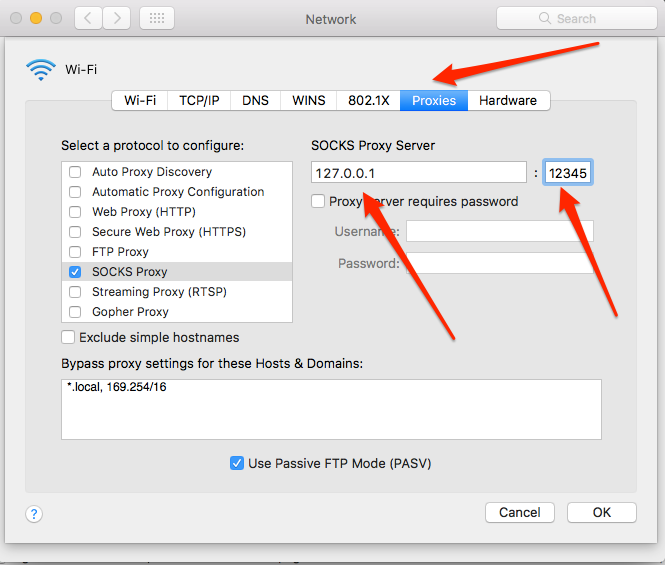
Here’s how you can set up a SOCKS5 proxy on macOS:
- Go to System Preferences > Network > Advanced.
- Click on the Proxies tab.
- Choose SOCKS5 under Select a protocol to configure.
- Enter your proxy server address.
- Click OK.
What Does the SOCKS5 Proxy Do
Some of the key features you’ll find with SOCKS5 proxy are:
- No data encryption makes it speed up the internet connection, but also less secure than other proxies.
- SOCKS5 can hide your IP address and replace it with a new proxy IP.
- For gamers and perpetual torrent users, SOCKS5 supports both UDP and TCP to handle various types of traffic.
- Friendly with your firewall settings.
- SOCKS5 has authentication features enabled to control access via username and password authentication.
Primary Use Cases of SOCKS5
Generally, the SOCKS5 proxy framework is designed to achieve the following objectives:
Cirumventing Geo-Blocks
In many parts of the world, accessing certain streaming, gaming, or sports websites is banned due to geo-restrictions. SOCKS5, in this case, helps them by bypassing these geo-restrictions and regional limitations.
Overcome IP Blocks
SOCKS5 proxy server will also protect you against certain IP blocks that occur when you access a regionally banned website or online service.
Torrenting
Yes! SOCKS5 is sufficient for torrenting because it enhances connection speeds while maintaining online anonymity.
Gaming with Low Latency
Gaming needs faster transmission of data with low latency, and SOCKS5 gives you this very perk so you can engage in seamless gaming anytime, anywhere.
Can You Get SOCKS5 for Free?
You can get a SOCKS5 Proxy for free from the popular websites, but know this will put your privacy and security at risk. SOCKS5 and other types of proxy protocols do not really require high processing power, and they come at a very reasonable price. So involving with the free SOCKS5 proxies will let you experience these two issues:
- Poor Performance
- Privacy Issues
Is VPN Better than SOCKS5?

Based on the most important aspects, let us compare whether the SOCKS5 proxy protocol is superior to a VPN.
Traffic Type
- SOCKS5 supports all types of internet traffic, even handles TCP and UDP protocols, ideal for gaming, streaming and P2P.
- A VPN does all that, but it also encrypts the online data of each and every app installed on your device.
Data Encryption
- SOCKS5 only serves to reroute your internet traffic; it doesn’t support data encryption.
- VPN encrypts all of your online data while securing data transmission by avoiding public networks.
Speed
- Since the SOCKS5 proxy server does not encrypt user data, it gives a marginally higher internet speed.
- VPNs are slightly slow in terms of speed due to their encryption feature. However, some top-notch VPN for Roblox in 2025 tends to be faster than SOCKS5.
Hiding IP Address
Both SOCKS5 and VPNs hide your IP address as a feature of anonymity by rerouting your traffic to a safe tunnel. But when it comes to the levels of anonymity, VPNs provide the highest level with encrypted data.
User-Friendly
- SOCKS5 requires an easy setup method, especially if you are doing it on a web browser.
- VPNs need to be installed on your device, after which you are one click away from performing all the functions.
When to Use SOCKS5 in 2025
If your use falls under any of the following categories, you can use SOCKS5.
- You don’t want data encryption, but want to hide your IP address.
- You require a fast and easy-to-set-up proxy protocol for specific purposes (gaming, streaming).
- Need to bypass geo-restrictions.
- In regions where online censorship and surveillance are in motion, SOCKS5 can be an ideal way to connect to the internet.
Conclusion
In 2025, SOCKS5 proxy is best for conducting business and for individuals who find HTTP or HTTPS hard to deal with. SOCKS5 is used for data fetching that is versatile in range, and it’s best for file-sharing. Moreover, SOCKS5 is also perfectly suited for Bitcoin wallets and even Tor, for that matter.
In terms of flexibility and speed, SOCKS5 simply rocks as a great tool. Whereas, a VPN like Ivacy VPN is a better choice if you need additional tools for cybersecurity or to bypass geo-restrictions without setting up a SOCKS5 proxy protocol.

Frequently Asked Questions
What is the main purpose of using proxies?
To prevent cybercriminals from entering a network.
Can I use SOCKS5 on Android?
Android does not have SOCKS5 support, but with the right app, you can use SOCKS5 on Android.
Should you use SOCKS5 with a VPN?
SOCKS5 and VPN should not be used together since both tools offer the same benefits but for different use cases. Top-ranked VPNs like Ivacy VPN can work with a SOCKS5-enabled device.