A Guide to Change Location on Google in 2025

- Why Change Location on Google?
- How to Change Location in Google Search Settings
- How to Change Location in Google Maps
- How to Change Location in My Google Account
- How to Change Current Location on Google Chrome
- How to Change Location Across All Google Services
- Can Google Track You If You Use a VPN?
- Is It Legal to Change Your Google Location?
- Conclusion
In the lives of 4.9 billion people, Google plays a crucial role in our daily lives by providing easy access to a vast amount of knowledge available online. Besides this, Google tracks multiple forms of activities of its users, including their location data. Now, before you put any allegations, Google says that it’s only for personalizing the search results, which allows you to explore content based on the location you are in.
Changing location on Google isn’t a big deal; you just have to know the basics of each device you are using. In this guide, we’ll define the best ways to change location on Google from anywhere.
Why Change Location on Google?
Before managing your location on Google, you may want to understand why it’s important to do it in the first place. From beginners to professionals, everyone uses the Google search engine for a variety of purposes, and this is where it all gets common:
- You can change the location on Google to access regionally limited or restricted content, primarily that which is unavailable in your region.
- You may want to limit the location tracking on Google to protect your privacy. This will lead Google to collect a minimum amount of data about you.
- For web developers or SEO experts, changing location on Google can show how well your project site or blog is doing rank-wise.
- For people who travel frequently, changing the location on Google to their native country will get them the best localized results while abroad.
How to Change Location in Google Search Settings
If you just want to change your location on Google for search results only, you can do it in search settings:
For mobile users
- Go to Google search.
- Tap on Menu > Settings > Search Settings.
- Under region, choose your preferred location and tap save.
For Desktop users
- Google search > Settings > Search settings.
- Scroll down until you see Region Settings.
- Select your country/region.
- Click Save.
How to Change Location in Google Maps
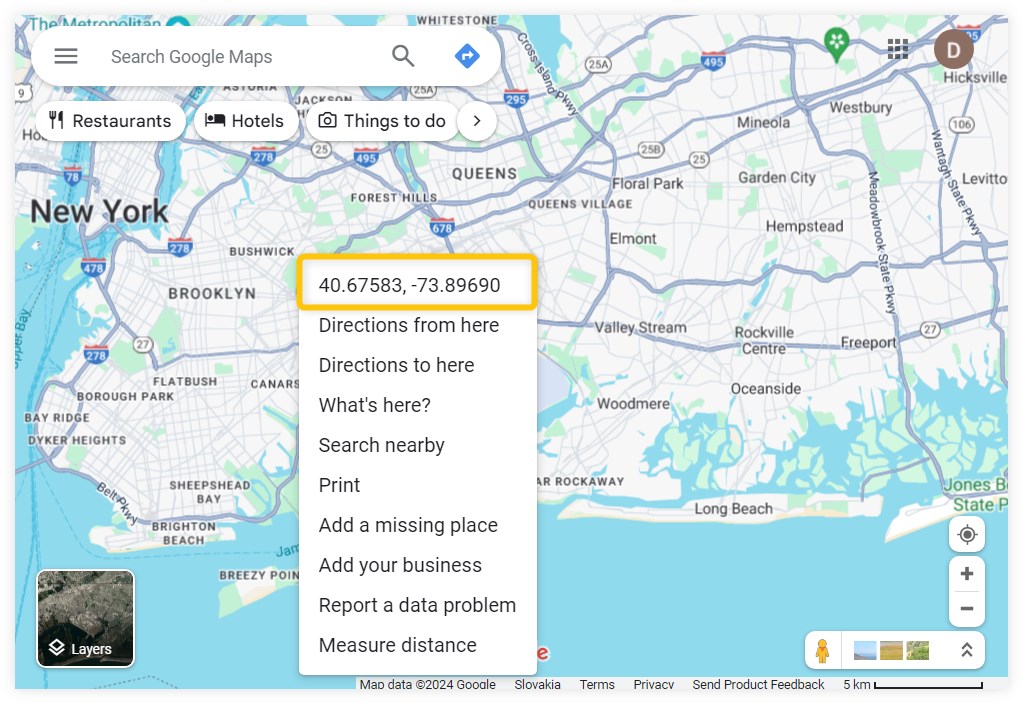
Correcting or managing location in Google Maps on Desktop can be done by:
- Launch Google Maps and go to the search bar.
- Provide your desired region.
- In the “Your Places” category, you can also change the location of Home and Work.
For smartphone users:
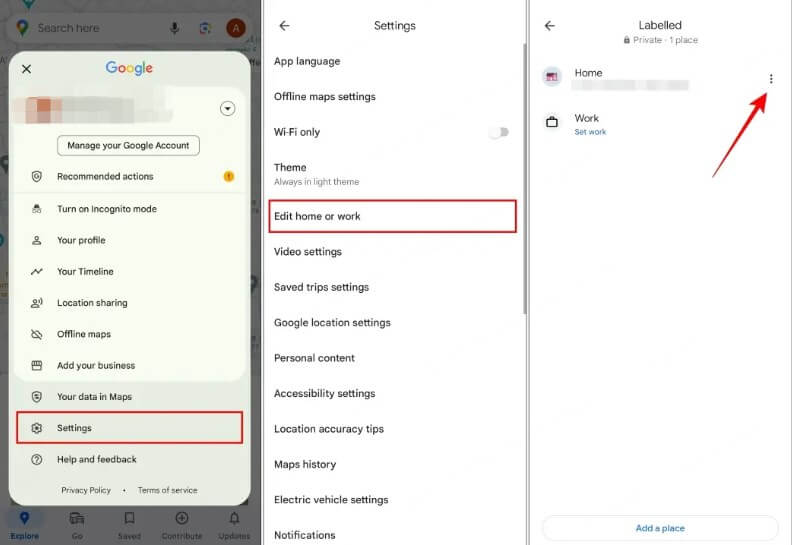
Go to Google Maps > Settings > Edit Home or Work. Enter the location you want to set in the search bar.
How to Change Location in My Google Account
Changing the location on a Google account is not like changing it on an individual Google service. You need to change your Home Address in this, which will also influence some major Google services like YouTube and Google Play Store.
- Go to Google Account > find Payments & Subscriptions > Manage payment methods.
- Choose Settings.
- Enter a new Home Address now.
You can do it on both your mobile phone and PC.
How to Change Current Location on Google Chrome
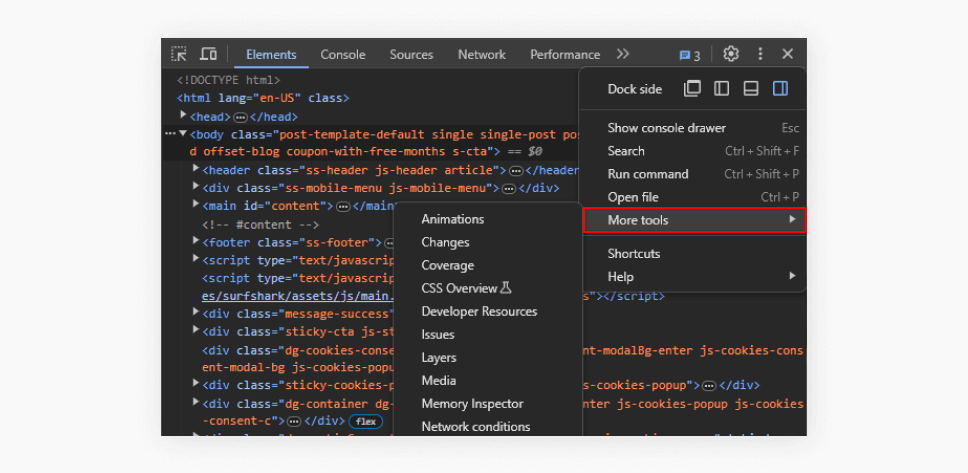
You can change your location on Google Chrome like millions of people do every day by following these steps:
- Open the Google Chrome app on your desktop.
- Navigate Developer Tools, or you can press Ctrl + Shift + I or F12.
- Go to three-dot menu > More Tools > Sensors.
- Under location, choose your desired location. You can also enter the coordinates of the location.
How to Change Location Across All Google Services
If you want to change location on Google’s overall services, a VPN is the best way with no strings attached. It can easily mask your IP address and change your location across all Google services, including Gmail, YouTube, search engine, Drive, and others.
- Download a VPN, i.e, Ivacy VPN.
- Open the VPN app and choose the server location you want to connect to.
- Test your location on Google, and it will connect to a different location.

Can Google Track You If You Use a VPN?
If you are using a VPN, Google will only see your IP address provided by the VPN server. There are many other benefits of using a VPN rather than changing location on Google, particularly one by one for every service.
- You can change the location on Google.
- You can access geo-restricted content.
- It encrypts your data while changing location or during normal browsing.
- A vast number of IP addresses across different regions.
Is It Legal to Change Your Google Location?
Yes, it’s legal to change your Google location if your intentions are not malicious. In some countries, accessing the regionally limited content is a cybercrime, which is why it’s important to use VPN services responsibly.
Conclusion
Changing location on Google can be tricky for beginners; therefore, changing it via VPN is safe, and you won’t lose your personal information. There are many pros and cons of changing location, so use the methods mentioned above if you need to.
To remain anonymous and secure across all Google services, modern VPNs are integrated with sophisticated security tools that keep your login information and credentials hidden from prying eyes. Since Google is also known to track and share users’ data, cybersecurity tools like Ivacy VPN are feasible for amateurs and professional users in 2025 to keep their information safe at all times.