McDonald’s Free Wi-Fi Login | Access McDonald’s Free Wi-Fi Network

If you’re a McDonald’s fan, you must know about Mcdonald’s free Wi-Fi. The all-time favorite food brand has offered its customers free Wi-Fi since 2010. Without any time, limitations, or bandwidth – users can choose to use McDonald’s free Wi-Fi to their heart’s desire. An estimated 14,000 Mcdonald’s outlets offer free Wi-Fi service in the US alone, expanding to many more locations worldwide.
Whether you want to connect with your friends, access the internet for study purposes, or work online – Mcdonald’s gives you the Wi-Fi access you’d never want to miss.
Are you wondering how to access Mcdonald’s free Wi-Fi network? Well, the simplest way is to tap through the Wayport_Access in your available options, accept the terms of conditions, and boom!
While free Wi-Fi access is way too tempting, it does bring along threats to the security of your information. Subscribing to Ivacy VPN can save you from the hassle of dealing with identity theft and keep you safe from all possible insecurities and threats. Here is how to use Ivacy VPN for unparalleled privacy and security:
- Get an Ivacy VPN subscription.
- Download Ivacy VPN on the device of your choice.
- Access Ivacy VPN and connect to a VPN server.
- Access any website with complete privacy and security online, which also applies to public Wi-Fi networks.

How to Connect to Mcdonald’s Wi-Fi?
The free Mcdonald’s Wi-Fi can be connected to multiple devices, including tablets, mobile phones, laptops, or anything else you might have at hand. However, different steps are required to connect to McDonald’s free Wi-Fi with each separate device. We’ve listed steps for each popular device individually to help you through!
How to Access McDonald’s Wi-Fi on Laptop?

Do you want to learn how to connect to the McDonald’s free Wi-Fi on your laptop so you can quickly get through work emails while having breakfast at your favorite outlet? Here’s a detailed list of steps to follow –
- Look for the Wi-Fi Icon in the Windows Taskbar at your laptop screen’s bottom right corner. It will show you an option for Wayport_Access.
- Click on the Connect option to establish the internet connection.
- Soon after the connection has been built, you’ll be directed to a McDonald’s Terms and Conditions web page.
- Click on Accept to move forward and tap through Get Connected.
- A message ‘You are connected to McDonald’s free Wi-Fi. Enjoy!’ will pop up on your screen.
- You can enjoy the free McDonald’s Wi-Fi for as long as you are inside the McDonald’s outlet.
- If you want to disconnect, you can always choose from the similar Wayport_Access option.
How to Access McDonald’s Wi-Fi with Android?

If you’re using an Android phone and wish to connect to the free McDonald’s Wi-Fi, it’s simpler than you’d have thought. Here’s the list of steps you must follow:
- Select the Wi-Fi option from your phone’s settings.
- A list of available networks will appear, select Wayport_Access and click Connect.
- Your Wi-Fi status will be turned to Connected.
- Open your web browser, and you’ll be automatically directed to the McDonald’s Wi-Fi Terms and Conditions page.
- Tap the Free Connection option and Agree to the listed terms and conditions. Your connection will be set up with the free McDonald’s Wi-Fi, and boom – you can enjoy free Wi-Fi for as long as you desire.
How to Access McDonald’s Wi-Fi on iPhone?

Got an iPhone with the ‘automatically connect’ feature activated? When you enter the food chain’s premises, you’ll see a McDonald’s Free Wi-Fi pop-up. You can directly tap on the option and boom – enjoy free internet.
Alternatively, you can follow the below-listed steps to access free Mcdonald’s Wi-Fi on your iPhone.
- Open Settings on your iPhone and click on the Wi-Fi option.
- Pick Wayport_Access from the available list of options. A message indicating ‘unsecured connection’ would appear below the Wi-Fi name.
- Open your default browser, and you’d be automatically directed to the Mcdonald’s Terms and Conditions page.
- Click on Accept and Get Connected to use the free McDonald’s Wi-Fi hassle-free.
Accessing McDonald’s Free Wi-Fi with Ivacy VPN

Follow these steps to safely connect to McDonald’s free Wi-Fi using Ivacy VPN:
Step 1: Download and Install Ivacy VPN
Visit the Ivacy VPN website and download the VPN application compatible with your device. Install it following the on-screen instructions.
Step 2: Create an Account
Open the Ivacy VPN application and create an account. You will need to choose a subscription plan, but rest assured, Ivacy VPN offers a money-back guarantee, so you can try it risk-free.
Step 3: Log In to Ivacy VPN
After creating an account, log in to the Ivacy VPN application using the credentials you just created.
Step 4: Connect to a Server
Once logged in, choose a server location. For best results, select a server that is geographically close to your current location. This will ensure a faster and more stable connection.
Step 5: Connect to McDonald’s Wi-Fi
Now that you’re connected to an Ivacy VPN server, you can safely connect to McDonald’s Wi-Fi. Open your device’s Wi-Fi settings, select the McDonald’s network, and enter any required information.
Step 6: Browse Safely
You’re now connected to McDonald’s free Wi-Fi through a secure VPN tunnel. Enjoy browsing, streaming, or working without worrying about potential security threats.
Is Connecting to Free McDonald’s Wi-Fi Safe?
While connecting to a free Wi-Fi service is always tempting, you have all the right to be suspicious about the security of public Wi-Fi. If you’re worried that connecting the McDonald’s free Wi-Fi might hurt your online privacy, you can always use some quality VPN service to keep your information and device secure.
Downloading Ivacy VPN can help you fabricate your online presence. As you connect to the free Wi-Fi service – all your identity, data, browsing history, and behavior will remain 100% safe and secure from possible threats.
You can also use a cookie manager to set your browser to block all the cookies manually. It can prevent advertisers from tracking your data, whether you’re using a private or a public network. In addition to that, switching to incognito mode while using a public Wi-Fi network can also secure your online presence. The incognito mode prevents your web browser from saving data, so third-party advertisers cannot see it.
Frequently Asked Questions (FAQs)
What is the password for McDonald’s free Wi-Fi?
Well, McDonald’s free Wi-Fi is called free for a reason. Instead, it does not require a password; you can directly establish your connection and enjoy uninterrupted browsing for free.
What is the name of McDonald’s free Wi-Fi network?
At most places and for most devices, it appears as ‘McDonald’s Free Wi-Fi.’ However, it may sometimes appear as ‘AT&T,’ Wayport_Access,’ or a possible variation.
How to know whether my McDonald’s outlet has the free Wi-Fi option or not?
McDonald’s has been offering free Wi-Fi services to its customers since 2010. Currently, up to 14000 locations (82%) in the US have this facility, so there’s a significant possibility that your Mcdonald’s outlet has the free Wi-Fi option. You can check by clicking the Wi-Fi option in your gadget’s settings.
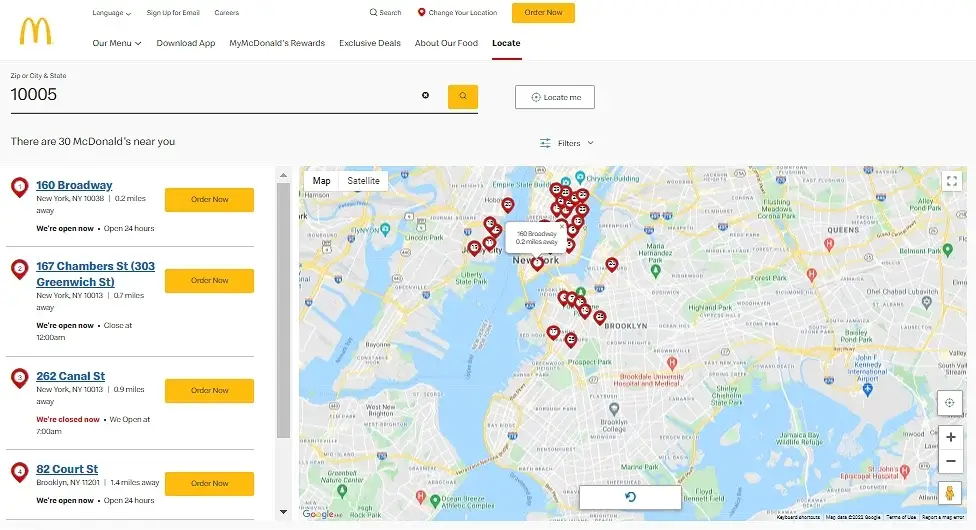
If you’re looking for a nearby Mcdonald’s outlet, they have this excellent locator tool to help you. All you have to do is type your town in the search bar, and a list of possible options will appear instantly.