How to Connect with Your Home Network Using a VPN
- What happens when you access your home network from outside
- Why a VPN is the safest way to access your home network
- Common pain points when trying to connect to your home network
- How to connect to your home network using a VPN
- Why Ivacy VPN is built for this
- Table: Comparing Remote Access Methods
- Final thoughts
- Frequently Asked Questions: FAQs
In 2022 alone, over 422 million people were affected by data breaches. Most of them weren’t huge corporations. They were individuals, remote workers, even families just trying to connect back home.
It’s easy to think of your home network as “safe by default.” After all, you set it up, your devices are known, and you probably haven’t thought much about securing it beyond the router password. But what happens when you’re traveling, working remotely, or just trying to access a file on your desktop from another location? That’s where things get messy.
Getting back into your home network without exposing it to threats isn’t just about convenience anymore. It’s about staying secure.
What happens when you access your home network from outside
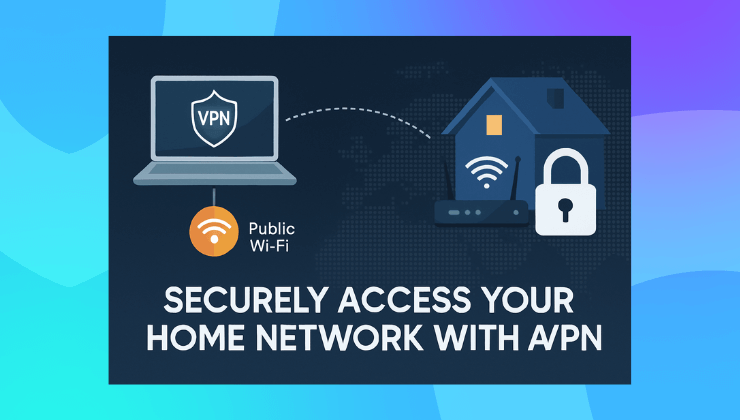
To connect to your home network remotely, you’re basically trying to tunnel into a private space from the public internet. And here’s the uncomfortable truth. That tunnel can become a highway for hackers if it’s not protected.
When you try to access your home devices remotely without protection, a few things can go wrong.
- You’re exposing your IP address, which can reveal your home location
- Any data you transmit can be intercepted
- Hackers can exploit open ports or unsecured devices on your home network
- Devices like smart cameras or shared folders become vulnerable
The biggest misconception is that only businesses need protection like VPNs. But in today’s digital world, your home is basically a micro-office. It deserves the same security.
Why a VPN is the safest way to access your home network
A VPN creates a secure, encrypted tunnel between your device and your home network. This means even if someone is snooping on public Wi-Fi or trying to sniff your traffic, they can’t see a thing.
More importantly, with the right VPN setup, you can connect to your home network as if you were right there on the couch. Your devices behave as if they’re on the same local network, even if you’re halfway across the world.
No exposing open ports. No complicated firewall rules. No stress.

Common pain points when trying to connect to your home network
People usually try to remote in using basic tools. Maybe a remote desktop app, maybe port forwarding on their router. It works until it doesn’t.
Here’s where things often break:
- Dynamic IPs: Most ISPs don’t give you a fixed IP, so your home IP keeps changing
- Router settings: You’ll need to set up port forwarding or DMZ, which opens you to security risks
- No encryption: Your data isn’t protected when connecting without a VPN
- Complicated setup: Remote desktop tools often need custom configuration and third-party apps
These approaches feel easy at first but create headaches down the road. Especially when your connection fails or worse, your data leaks.
How to connect to your home network using a VPN
Here’s the better approach. You install a VPN on your home device or router and then use a VPN app on your remote device to connect. When done right, it feels like you never left your home Wi-Fi.
Steps look something like this:
- Install a VPN on your home router or a dedicated device
This ensures that everything inside your home network is covered, from your PC to your printer - Set up remote access on your VPN account
This gives your device the credentials and tunnel to safely connect back home - Connect to your VPN from anywhere
Use your VPN app to log in and choose your home IP - Access shared folders, devices, and files as if you’re home
That’s it. No need to mess with port forwarding or insecure apps
A setup like this gives you complete peace of mind. You can check security cameras, grab large files from your PC, or print remotely without opening up your home to the web.
Why Ivacy VPN is built for this
Not all VPNs are suited for this kind of setup. Ivacy VPN offers exactly what you need to turn your home into a private, secure base you can access anytime.
Here’s what makes Ivacy a solid choice:
- Dedicated IP support so you always connect to the same IP
- Port forwarding options for advanced users who still want flexibility
- Multi-device support so your entire household setup stays covered
- Apps for routers, desktops, mobile devices so you can set up your network or just connect on the go
- 256-bit encryption and no-logs policy for full peace of mind
What makes it especially useful is how easy it is to set up. Even if you’re not a techie, you can get Ivacy running on your home router and connect securely in minutes.
And if you’re someone who travels or works remotely often, having access to your home setup securely is a game-changer. You can learn more about these features here.
Table: Comparing Remote Access Methods
| Method | Security | Setup Difficulty | Risk Level | Recommended For |
| Remote Desktop | Low (unencrypted) | Moderate | High | Occasional access |
| Port Forwarding | Low | High | Very High | Not recommended |
| Cloud Drive Access | Moderate | Low | Medium | File-only access |
| VPN with Ivacy | High | Low | Low | Full secure access |
Final thoughts
If you ever find yourself needing something from your home device while away, don’t gamble with basic tools or public IP exposure. Use a VPN. Use it well.
Ivacy VPN is built for this exact need. It lets you create a private link between you and your home network without sacrificing speed or security. You’re not just connecting to a network. You’re reconnecting to your base, safely.
Frequently Asked Questions: FAQs
Can I access my smart home devices through a VPN?
Yes. With Ivacy VPN installed on your router, any connected smart device can be accessed securely from anywhere.
Do I need a static IP to use a VPN for home access?
It helps, but with Ivacy’s Dedicated IP add-on, you can bypass dynamic IP issues and always connect to the same home IP.
Is it safe to access my home network from public Wi-Fi using a VPN?
Yes. Ivacy VPN encrypts your data so no one on public networks can intercept your traffic.
Can I install Ivacy VPN directly on my router?
Yes. Ivacy supports a wide range of routers. Installing it on your router protects all devices in your home network automatically.
What’s the benefit of using a Dedicated IP for home access?
A Dedicated IP gives you a consistent address to connect to your home, making setup easier and more reliable for remote access.