How to Delete Telegram Account [2025 Guide]

Telegram is a cloud-based messaging app renowned among professionals, offering better privacy, security, and speed than many others. You can find the hidden treasures of the internet on many Telegram pages and groups, and the app is smooth as well as minimalistic. Whatever the reasons are for deleting your Telegram account, you must find ways to do it easily.
In this guide, we’ll explain the precise methods of how to delete a Telegram account permanently. and other important factors pertaining to the messaging app.
Why Delete a Telegram Account in the First Place?

In 2025, many Telegram users are bidding adieu to the messaging app because of the following reasons:
Privacy Concerns
Digital privacy is something that many people take seriously. Telegram may claim to offer secure communication between user and their friends, but that is still not enough for many people, thus forcing numerous users to switch to other communication tools. However, the privacy problem can be solved with the help a reliable VPN service.
Better Alternatives
Telegram may not be the best option for effective communication. There are apps like WhatsApp that serve the purpose of communication far better. This is probably the biggest reason a person would want to know how to delete a Telegram account.
Friends are Switching to Another App
Sometimes, a person merely switches to another app because all their friends are using another. After all, if there are no friends to communicate with on the app, then what’s the point of using that app?
Can Data Be Retrieved from a Telegram Account?
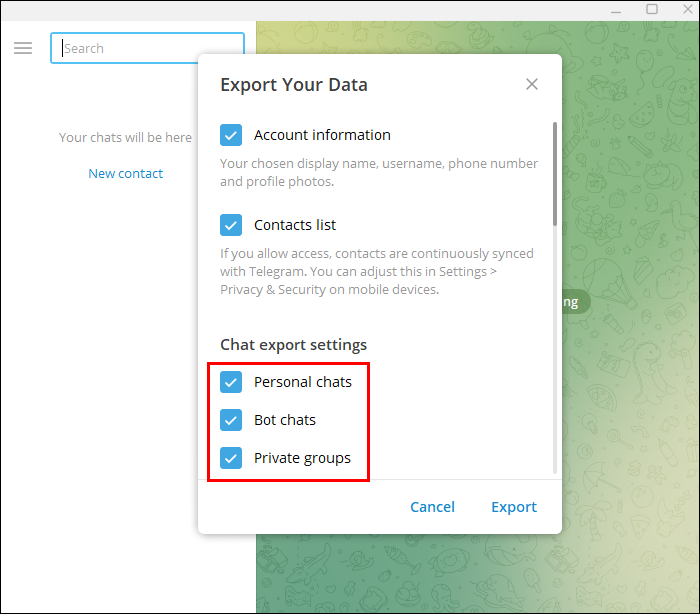
Yes! You can certainly retain your data saved in your Telegram account. Before deleting, retrieving your data is a wise decision to get back all the essential information you have been gathering on Telegram for years. You need to use the PC for Telegram data retrieval.
- Launch the Telegram app on your PC browser.
- Go to Settings > Advanced > Export Telegram data.
- Select the media files or messages you want to export.
- Choose the destination for the download.
- Click on “Export” to begin the process.
Methods to Delete Telegram Account in 2025
If you wish to delete your Telegram account permanently, there are ways to do so either slowly or over an extended period of time. We will explain both ways, considering there is a mixed reaction of users regarding Telegram account deletion.
Delete Telegram Account on Phone (Android, iOS)
This method explains how to delete a Telegram account from the app:
- Open the Telegram app installed on your mobile device.
- Go to Settings > Privacy and Security.
- Scroll down until you see Delete My Account.
- Select the deletion method between self-destruct timer and delete immediately.
- The Self-Destruct Timer option allows you to select multiple deletion time periods, i.e., 1 month, 3 months, 6 months, or 1 year.
- Clicking “Delete Immediately” will redirect you to a webpage to confirm. You need to enter your phone number and get a confirmation code.
Delete Telegram Account on Desktop (PC, Mac)
Deleting a Telegram account on a desktop is relatively easier than on a mobile phone, as you only have to go through a short process.
- On a web browser (Chrome, Safari), go to the Telegram deactivation page.
- Enter your phone number associated with the account.
- Click Next.
- You will get a confirmation code; enter that into the field.
- Write a reason for deleting your account, and click Delete My Account.
This method is irreversible, as there is no deactivation period, and you will not be able to cancel the deletion. If you wish to sign up using the same phone number, you have to wait for a couple of days.
Telegram Account Auto-Deletion
Telegram offers a unique feature in the app where you can choose a time period after which your account will be automatically deleted if it remains inactive. This is the best option for many users who need some time to think about their decision. However, with this auto-deletion, your messages, contacts, group chats, liked pages, and media files will be completely gone.
You can, however, choose your own inactivity timer, which is available on the Telegram app’s Settings.
- Tap on Privacy & Security > Delete My Account If Away For.
- You will get four options: 1 month, 3 months, 6 months, and 1 year.
How to Bypass Censorship of Telegram

As of 2025, Telegram is still unavailable in some regions due to geo-restrictions. You can also find many streaming platforms and social media sites with the same problem. A vast number of technologically educated individuals opt for VPN services to bypass this type of restriction, which allows them to access Telegram from anywhere. Choose a VPN with versatile servers and security features to help you make Telegram available in your region securely.
Conclusion
Smartly conceived, Telegram has a built-in auto-deletion process that deletes your account upon inactivity. Based on this fact, deleting your Telegram account immediately isn’t a wise choice. But if your reasons are legit, you can delete your Telegram account permanently by applying the desktop method.
Moreover, if you are unable to access Telegram in your region due to regional limitations, consider using a VPN (Virtual Private Network) that allows you to bypass regional restrictions, protects you from ISP and government surveillance, and maintains complete anonymity.

Frequently Asked Questions
Which country doesn’t allow Telegram?
In 2025, Telegram is still unavailable in China, Iran, Pakistan, Thailand, and some parts of Russia.
Can a deleted Telegram account be retrieved?
Once a Telegram account is deleted, it cannot ever be recovered. However, one can send an official request to Telegram to recover an account. But that is again solely decided by Telegram.
What happens to my Telegram groups if I delete my account?
Your group will not be deleted, but a new admin will be randomly assigned from the group members.
How to delete my Telegram account permanently?
Users can delete their Telegram account by following the process discussed above.